When you follow an indoor cycling workout, the instructor’s cues help you perform each exercise as intended. Resistance, however, is harder to match precisely. It depends on the bike you’re riding and your individual fitness level.
What you can match directly is the instructor’s pedalling speed. Training with RPM lets you see how fast the instructor is pedalling and whether your own pace matches theirs. Combine this information with your power output or heart rate zone, and you can follow the same pace while training at an intensity that suits you.
But what exactly does RPM mean? What does it tell you about your workout? And how can you use the instructor’s data and your own bike’s readings to train with more focus?
What does training with RPM mean?
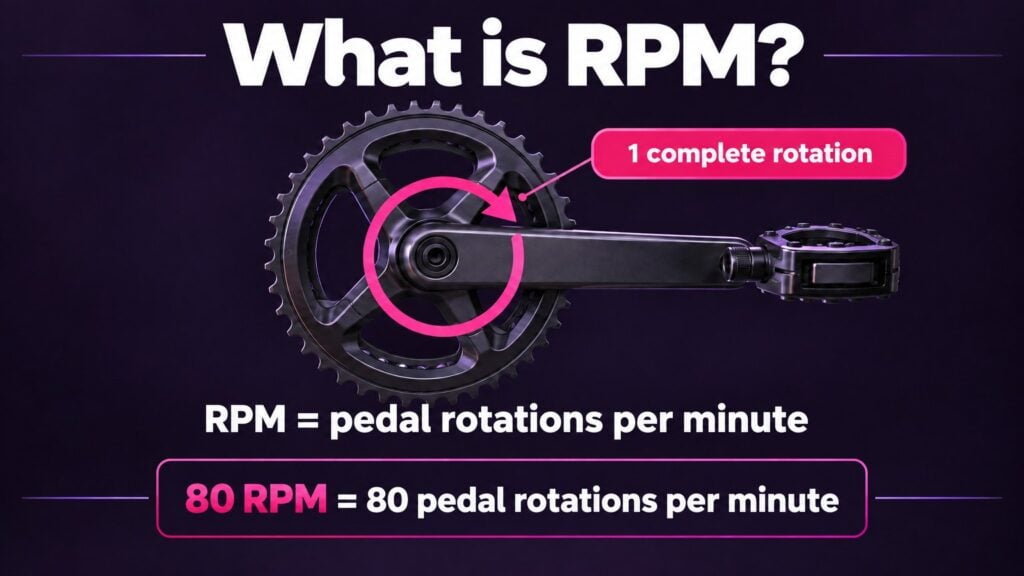
RPM stands for revolutions per minute. It indicates how many full revolutions your pedals make in one minute. RPM is also referred to as cadence or pedalling speed. Riding at a cadence of 80 RPM? That means your pedals complete eighty full revolutions per minute. The two pedals rotate together, completing one full revolution as a pair.
RPM is the unit of measurement. Cadence is the term for your pedalling speed. You may therefore see both “an RPM of 80” and “a cadence of 80 RPM”. In the CycleMasters interface, your current pedalling speed is displayed as Cadence.
RPM tells you how fast you’re pedalling. On its own, it doesn’t tell you how much force you’re applying, how much resistance is set on your bike or how much power you’re producing.
What does RPM tell you about your workout?
RPM makes your pedalling speed measurable. During a workout, this reading can help you:
- Follow the instructor’s pace.
- Speed up or slow down in a controlled way.
- Maintain a steady pace.
- Recognise the differences between a climb, a sprint and a recovery track.
RPM gives you immediate feedback, so you don’t have to rely solely on what you see, the music or how you feel.
A high RPM doesn’t automatically mean high intensity
A high RPM reading doesn’t necessarily mean you’re performing better. Cadence only tells you how fast you’re pedalling, not how hard you’re working.
You can pedal very quickly with hardly any resistance. Your RPM will be high, but your power output may remain low. Conversely, you can pedal more slowly with plenty of resistance and produce a high power output.
The intensity of your workout comes from a combination of:
- Your cadence.
- The resistance on your bike.
- The power you produce.
- The duration of the effort.
- How your body responds to the effort.
RPM isn’t a score. A higher cadence isn’t automatically better, and a lower cadence doesn’t mean you’re getting less out of your workout. The right pedalling speed depends on the purpose of the track.
How is RPM measured?
Your pedalling speed can be measured in several ways:
- By an indoor bike with built-in cadence measurement.
- With a separate cadence sensor.
- With a sensor on the crank or pedal.
- Through a connected bike that sends the reading to CycleMasters.
A cadence sensor records how often the crank or pedal rotates. The measured value is then displayed as RPM. To see your current cadence on screen during a CycleMasters workout, you need a connected bike or cadence sensor that transmits this data.
Comparing the instructor’s RPM with your own
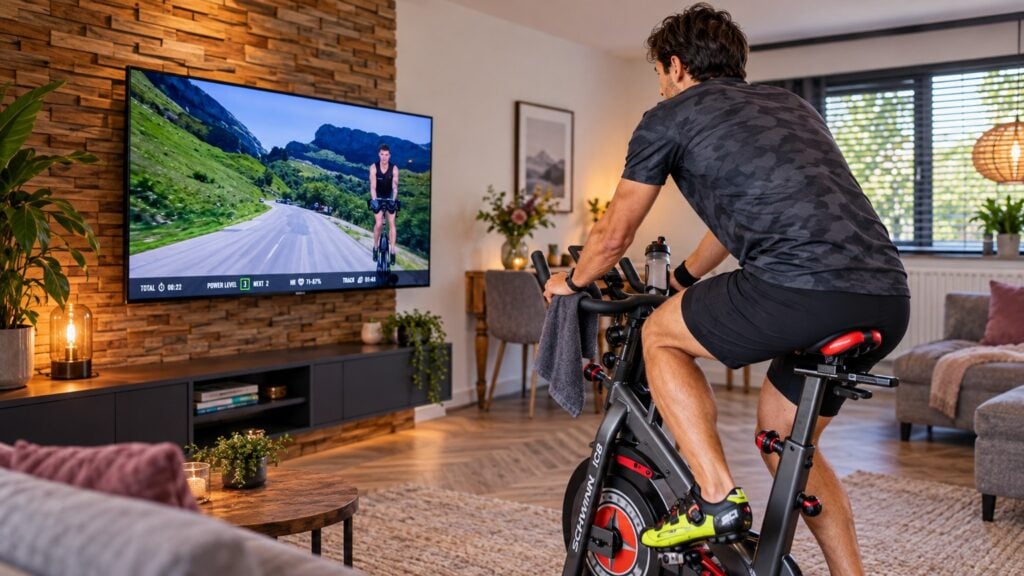
During a CycleMasters workout, the instructor’s cadence shows you the intended pedalling speed for the track or exercise. Your own RPM shows how fast you’re actually pedalling at that moment. Comparing the two makes it easy to see whether you’re following the target pace.
Suppose the instructor is riding at 85 RPM:
- Is your cadence showing 76 RPM? Gradually increase your pedalling speed.
- Are you riding at 84 RPM? You’re very close to the target pace.
- Is your cadence showing 94 RPM? Slow down slightly to match the instructor more closely.
You don’t need to hit exactly the same number every second. Small fluctuations are normal. Focus on staying close to the target RPM throughout the track and keeping your movements controlled.
How to compare the instructor’s data with your own
You can use the data in a consistent sequence during your workout.
Check the instructor’s pace
Look at the intended pedalling speed for the track. The instructor’s movements, the music and the displayed RPM help you recognise the target pace.
Check your own cadence
Compare the instructor’s pace with the reading under Cadence. This shows whether you’re pedalling faster or slower than intended.
Adjust your pedalling speed gradually
Avoid trying to correct a large difference all at once. Gently speed up or slow down until you’re close to the target pace.
Adjust the resistance
Once you’ve found the pace, choose a resistance level that allows you to move with control and reach the intended intensity.
Check your target zone or power output
Do you also use power or heart rate data? This can help you tailor your workout even further. If you’re riding at the right pace but your current zone remains below the target zone, your resistance may be too low. If you’re above the target zone, your resistance may be too high.
Keep paying attention to your technique and how you feel
The numbers support your workout, but a stable riding position and controlled pedal stroke matter more than hitting one exact number.
Combining RPM, resistance, power output and target zones
Together, cadence and resistance play a major role in determining how much power you produce. The same RPM can therefore feel very different at different resistance levels.
| Cadence | Resistance | Result |
|---|---|---|
| High | Low | Fast pedalling, but potentially low power output |
| Low | High | Slower pedalling with plenty of force |
| High | High | A very intense effort |
| Low | Low | An easy effort or recovery |
The exact outcome varies from person to person. The main point is that RPM and resistance work together during a workout.
Each reading tells you something different:
- RPM shows how fast you’re pedalling.
- Power output, measured in watts, shows how much power you’re producing.
- The target zone indicates the intended intensity of that section.
- Heart rate shows how your body responds to the effort.
- Resistance makes pedalling easier or harder.
The RPM target tells you how fast to pedal. The target zone tells you how intense the section should be. Combining the two allows you to follow the workout’s pace while adjusting the effort to your own level.
Suppose the instructor is riding at a cadence of 80 RPM and the track calls for zone 4. You can approach the workout as follows:
- Gradually bring your cadence to around 80 RPM.
- Check your current zone.
- Add resistance if you remain below the target zone.
- Reduce resistance if you move above the target zone.
- Check that your riding position and pedal stroke remain stable.
This way, you ride at roughly the same pace as the instructor while using a resistance level that suits your individual power capacity. A beginner and an experienced cyclist can therefore ride at the same cadence while producing different power outputs.
Don’t have power measurement? Use your breathing, how you feel and the instructor’s cues. In an easy zone, the effort should feel sustainable. In a high zone, pedalling should feel noticeably hard and challenging.
What if you can’t reach the target RPM?
Sometimes you may find that you can’t match the instructor’s cadence. That doesn’t automatically mean you’re doing the workout incorrectly.
Possible reasons include:
- Your resistance is too high.
- You’re not yet used to the pedalling speed.
- You’re tired.
- Your bike isn’t set up correctly.
- The requested combination of pace and resistance is too demanding at that moment.
- You need more time to develop your pedalling technique.
First, reduce the resistance slightly and see whether you can get closer to the target pace while staying in control. Still struggling? Choose a lower cadence that allows you to maintain good posture and technique.
Riding a few RPM below the target is a better choice than moving without control just to reach the number at all costs. The goal is to follow the purpose of the workout as closely as possible, rather than copy every single pedal revolution the instructor makes.
What if you pedal faster than the instructor?
Faster isn’t automatically better. A higher RPM than the target may mean that:
- Your resistance is too low.
- You’re missing the intended focus of a climb or strength track.
- Your pedal stroke is becoming less controlled.
- You’re generating speed but little power.
- You’re using more energy than necessary.
Gradually slow down towards the target RPM. Then check whether your resistance suits the intended target zone.
During a strength track, deliberately pedalling more slowly with greater resistance may be exactly what’s intended. If you race through it at a high cadence, you may end up doing a very different workout from the one planned.
What does good pedalling technique look like?
RPM is only useful if you can perform the movement with control. Pay attention to the following points while riding:
- Keep your upper body as stable as possible.
- Avoid letting your hips rock from side to side.
- Keep your knees aligned with your feet.
- Move smoothly through the full pedal revolution.
- Avoid bouncing in the saddle.
- Maintain enough resistance to stay in control of the pedals.
Do you start bouncing in the saddle at a high cadence? Your pedalling speed may be too high, your resistance too low or your bike incorrectly set up. Slow down and check your settings before speeding up again.
Can you measure progress with RPM?
Improving your cadence doesn’t mean you need to keep reaching higher numbers. It’s mainly about control, efficiency and your ability to follow the requested pace.
Possible signs of progress include:
- You can maintain the target RPM for longer.
- You respond to changes in pace more quickly.
- Your pedal stroke stays smoother at a higher cadence.
- You can ride at the same RPM with more resistance.
- You produce more power at the same cadence.
- Your heart rate is easier to manage during a similar effort.
- You need fewer adjustments to maintain the pace.
- You can follow the instructor’s cadence without constantly looking at the screen.
Where possible, compare the same workout or tracks with a similar structure. Look beyond your average RPM. A workout with lots of climbs will probably have a lower average cadence than one with lots of accelerations. That says nothing about the quality of your training.
Do you need a cadence sensor?
You don’t need a cadence sensor to follow an indoor cycling workout. You can also find the pace using:
- The instructor’s movements.
- The rhythm of the music.
- The cues given during the workout.
- Your own feel for pedalling speed.
A cadence sensor or connected bike does give you objective feedback. You can see exactly how fast you’re pedalling and how close you are to the instructor’s pace. This can be especially useful when you’re just starting out, find changes in pace difficult or want to work more specifically on your pedalling technique.
Follow the pace and train at your own level
RPM shows how fast you’re pedalling. Comparing your own cadence with the instructor’s lets you see straight away whether you need to speed up, slow down or maintain your pace.
The instructor’s RPM helps you follow the purpose and rhythm of the track. You choose your own resistance based on your level, the target zone, your power output and how the effort feels. This allows different riders to pedal at the same pace without using exactly the same resistance or producing the same power.
With a connected bike or cadence sensor, you can see your current Cadence on screen during a CycleMasters workout. This makes it easier to follow the instructor’s pace while adjusting your effort to a level that feels achievable and challenging for you.